
Shell Shockers: Browser FPS Gameplay and Beginner Tips
Shell Shockers is an egg-themed multiplayer first-person shooter played through its browser game site. It is not a PS2 title or a card-based space game. Its cartoon characters sit inside a competitive shooting game, so check its gameplay and online features before choosing it for a younger player.

Learn the controls in the current player
Start with the control guide shown by the game. Movement, aiming, jumping, reloading and changing equipment need to feel comfortable before you focus on a high score.
If aiming feels erratic, choose a sensitivity that lets you make small corrections. Keep it consistent while learning a map instead of changing it after every difficult match.
Use cover and plan your next position
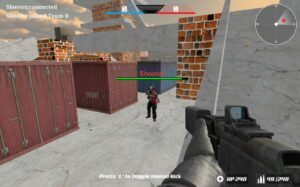
Move with a destination in mind. A corner or obstacle can give you time to look at the next area without exposing the entire character.
Avoid chasing an opponent into an unfamiliar route just because the opponent is nearly out of sight. You may be giving up a useful position for an uncertain encounter.
Follow the mode’s objective
Read the selected mode rather than assuming every match is a simple free-for-all. Team objectives, survival and personal eliminations can reward different decisions.
- Learn the routes between important areas.
- Watch where opponents tend to appear.
- Reload or recover in a position that gives you room to respond.
- Use the score as feedback rather than the only goal of a first session.
Official access and player expectations
Use the official Shell Shockers site for the live game and its current options. We do not provide a console conversion or a separate desktop installer.
Connection quality, browser performance and input devices can affect the experience. If a session feels inconsistent, resolve those basics before treating every missed action as a strategy problem.
Official information: Shell Shockers — developer or authorized listing.
Keep exploring
For another challenge, browse shooting games in Crazy Games Arcade. Each game listing provides its own player and control information.
Related reading: Multiplayer Shooting Games: Teams, Maps and Getting Started; 3D Shooting Games: Camera, Aiming and Movement Basics.